Paging 3 on Android
An easy implementation guide for traditional UI and Jetpack Compose

Hi, I'm Abu Yousuf.
Software engineer, currently focusing on Android.
RecyclerView is used to display a large set of data with a limited window. In RecyclerView we can display paged data. The Paging library makes it easy to show paged data in RecyclerView.
Before Paging library
Before paging the library, we can display paged data in RecyclerView but we have to maintain lots of states. We have to track the current page and append or reset data in the Adapter based on different states. Like
When the user reaches the last displayed element in RecyclerView we have to fetch the next data for the next page and then append the next page data to the adapter.
When a user wants to refresh data we fetch initial page data and then reset Adapter data with new data.
We have to manually decide when we need to show the loading state for RecyclerView
And there may be other states we have to maintain
Developers may also implement pagination in different ways and implementation may also have bugs.
Paging Library
The Paging library solves this problem and makes it easy to implement pagination. Official doc describes the benefits of the paging library. You can check I will not add those here.
The paging library operates in 3 layer
Repository layer
ViewModel layer
UI layer
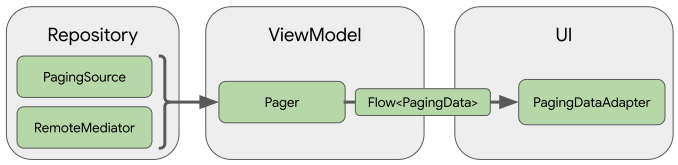
Steps of Paging 3 library use
Define a data source
This is the Repository layer. First, you have to define a PagingSource implementation. PagingSource can load data from any single source like a remote source or local database. I will use a remote source here. The PagingSource class includes a load() method, which you need to override to indicate how to load data from the corresponding data source. The pagingSource class PagingSource<Key, Value> has two parameters Key and Value . Key is used as an identifier to load the data and Value is the type of data. If we get a list of User from the server then the Key would be Int (server will give data for pages 1, 2, 3....) and Value would be User . Let's see the PagingSource implementation
class NewsRemotePagingSource (private val topHeadlineService: TopHeadlineService) : PagingSource<Int, NewsArticle>() {
    override fun getRefreshKey(state: PagingState<Int, NewsArticle>): Int {
        return 1
    }

    override suspend fun load(params: LoadParams<Int>): LoadResult<Int, NewsArticle> {
        val requestPage = params.key ?: 1
        return try {
            val response = topHeadlineService.getNews(page = requestPage)
            val body = response.body()
            if (response.isSuccessful && body != null) {
                val previousLoadCount = 0.coerceAtLeast(requestPage - 1) * networkPageSize
                val remainingCount = body.total - (previousLoadCount + body.articles.size)
                val nextPage = if (remainingCount == 0) {
                    null
                } else {
                    requestPage + 1
                }
                val prePage = if (requestPage == 1) null else requestPage -1
                LoadResult.Page(
                    data = body.articles,
                    prevKey = prePage,
                    nextKey = nextPage
                )
            } else {
                LoadResult.Error(Exception("Response body Invalid"))
            }
        } catch (ex : HttpException) {
            LoadResult.Error(ex)
        } catch ( ex: IOException) {
            LoadResult.Error(ex)
        }
    }

    companion object {
        const val networkPageSize = 20
        const val initialLoad = 20
        const val prefetchDistance = 2
    }
}
Here I am fetching NewsArticle from a remote server. Key is Int and Value is NewsArticle. TopHeadlineService class provides NewsArticle list. For successful result, we need to return LoadResult.Page with data, prevKey, nextKey . We have to calculate prevKey and nextKey for proper pagination and it's easy to calculate. For prevKey if the current page is 1 then prevKey is null else currentPage+1 . For nextKey if there is more data than currentPage+1 else null . For any error state, we need to return LoadResult.Error .
Setup stream of PagingData
This is the ViewModel layer. In this layer, you have to setup a stream of paged data from PagingSource. I will use Flow for data stream. The Pager class can provide flow of PagingData object from a PagingSource . Now create a Pager with PagingConfig and a function that tells Pager how to create an instance of PagingSource implementation. Let's see the code.
fun getFlow() : Flow<PagingData<NewsArticleUi>> {
    return Pager(
        config = PagingConfig(
            pageSize = NewsRemotePagingSource.networkPageSize,
            initialLoadSize = NewsRemotePagingSource.initialLoad,
            prefetchDistance = NewsRemotePagingSource.prefetchDistance,
            enablePlaceholders = false
        ),
        initialKey = 1,
        pagingSourceFactory = { NewsRemotePagingSource(newsService) }
    ).flow
        .cachedIn(viewModelScope)
}
Here is create PagingConfig with some initial value. I disabled placeholders as I don't need it now. I will not explain the placeholder concept here. I will try to explain in another blog. For details about PagingConfig check the official doc. The cachedIn() operator will make the data stream shareable and cache the loaded data with viewModelScope . Keep in mind that you have to create new PagingSource implementations for every Flow
Define the RecyclerView adapter and display in UI
This is the UI layer. In this layer, you have to set up an Adapter that will be used to show data in RecyclerView. The paging library provides PagingDataAdapter what we need to use. Create a class that extends PagingDataAdapter . Let's see some code for Adapter and ViewHolder
class NewsArticleViewHolder(private val binding : LayoutNewsItemBinding) : ViewHolder(binding.root) {
    fun bind(newsArticle: NewsArticle) {
        with(newsArticle) {
            binding.tvTitle.text = title
            binding.tvSource.text = source.name
        }
    }
    companion object {
        fun create(parent : ViewGroup) : NewsArticleViewHolder {
            val binding = LayoutNewsItemBinding.inflate(LayoutInflater.from(parent.context), parent, false)
            return NewsArticleViewHolder(binding)
        }
    }
}
class NewsAdapter : PagingDataAdapter<NewsArticle, NewsArticleViewHolder>(NewsArticle.DiffCallback) {
    override fun onBindViewHolder(holder: NewsArticleViewHolder, position: Int) {
        val newsArticle = getItem(position)
        holder.bind(newsArticle)
    }

    override fun onCreateViewHolder(parent: ViewGroup, viewType: Int): NewsArticleViewHolder {
        return NewsArticleViewHolder.create(parent)
    }
}
You have to pass DiffUtil.ItemCallback for the model class. I will not explain it here to keep it simple. You can check DiffUtil.ItemCallback the official doc.
Now everything is ready to display data on UI. To connect all these elements you have to collect data from Flow and submit PagingData to Adapter. To collect data from Flow launch a coroutine do this task inside the coroutine. Here is the code
lifecycleScope.launch {
    viewModel.getFlow().collectLatest { pagingData ->
        newsAdapter.submitData(pagingData)
    }
}
Now your RecyclerView will display data and will automatically load next page data.
Integration with Jetpack Compose
Lastly, if you are using compose then adding paging for compose is very easy. You need to just add one line to populate LazyColumn . You need to convert the flow from ViewModel to LazyPagingItems<T> . Flow.collectAsLazyPagingItems() convert flow to LazyPagingItems<T> . Let's see the code for compose
@Composable
fun NewsList(articleList: LazyPagingItems<NewsArticleUi> ) {
    LazyColumn{
        items(
            count = articleList.itemCount,
        ) { index ->
            val article = articleList[index]
            article?.let { item ->
               NewsArticle(
                   modifier = Modifier.fillMaxWidth().padding(8.dp),
                   article = item
               )
            }
        }
    }
}
flow.collectAsLazyPagingItems() makes it easy to compose.
Call the compose function NewsList() like below
val articleList = viewModel.getFlow().collectAsLazyPagingItems()
NewsList(articleList)
Good luck with your paging journey. Happy coding.